Building a PureGym MCP server

I have spent the last few weeks building a Model Context Protocol server exposing PureGym’s functionality.
The project is called puregym-mcp. It exposes structured tools to search classes, list centers, inspect bookings, check live center status and opening hours, and, when credentials are configured, book or cancel classes. It even has a landing page!
Before getting into the story, here is the current package in action, using Mistral’s Le Chat:
This post is about why I built it, how it evolved from a more bot-shaped thing into an MCP server hopefully useful to someone else than me, and what it taught me about the current state of AI tooling in the real world.
Before we start: this is an independent third-party project and is not affiliated with, endorsed by, or sponsored by PureGym. PureGym is a registered trademark of PureGym Limited.
It started with a very normal problem
Don’t be fooled: the most annoying part of being a Spaniard living in Denmark is not the weather or the food. It’s not even trying to pronounce rødgrød med fløde without choking. It’s the obsession around scheduling.
Perhaps it’s not Denmark’s fault, and it’s just an aspect of adult life I have difficulty coping with, but here, everyone schedules way in advance, be it meeting with friends, going out to discos, concerts… And also: gym classes.
At my gym (not sponsored by them in any way or form), you can book classes up to a month in advance, and keep as many as 18 bookings at once. In practice, that means the popular classes are often taken well before the week they happen.
So the game becomes: book early enough to get the classes you might want, then remember what you’ve booked, and cancel in time if plans change so you do not get charged a fee. I am definitely not built for this. Whenever I tried, I either booked too late and didn’t get a spot, or forgot I had booked at all. I ended up not going to classes at all, paying more in no-show fees than a month’s subscription, while also blocking spots someone else might have used.
Finally, I got tired and did the obvious, reasonable, totally sane thing: built a Telegram bot that books for me, sends me reminders about the classes I booked, and lets me manage the bookings from the notification itself. Noice.
And once I had the API layer somewhat figured out, I gave in to the LLM-hype and decided to expose that to an AI client via MCP.
The reverse-engineering detour
The first version of the MCP used the same web API you use when you search for classes and book through the web. That worked, but it had problems: the auth cycle is terribly slow, and some endpoints relied on parsing the HTML site, making the whole setup brittle. Plus, there’s some functionality in the app that’s just not available on the web, like live center occupancy and expected occupancy by hour throughout the week. In the end, getting visibility into what the mobile app was actually doing became the hardest part of the project.
First thing I thought: man in the middle. Maybe those YouTube VPN ads with some guy in a hoodie sitting in an Espresso House waiting to steal your bitcoin over public WiFi had actually been trying to prepare me for this moment.
So, I downloaded mitmproxy on my laptop, and set my phone to use my computer as a proxy in the WiFi settings. After that, I had to install its certificate on the phone, otherwise it would reject every HTTPS request. And the browser worked! The PureGym app, however, didn’t want to, and refused to connect.
After a bit of reading, I found that some apps trust certificates installed in the system trust store, which you can do modify in a rooted phone. So, I took the old phone I had from this other project and tried it out with Magisk. Aaaaand… no luck. The phone was too old and kept erroring on installs of the app, the certificates, couldn’t even access websites through the proxy.
Later, inspired by this article, I tried to emulate a rooted Android device. That worked, I could install the mitmproxy certificates in the system and it worked fine. But PureGym still wouldn’t budge. Allow me to introduce the concept of certificate pinning, where the application or device has a preconfigured list of public keys or certificates that it explicitly trusts, specifically to prevent MITM attacks.
It seems PureGym is doing this. Great, just great. I got to the point where even ChatGPT was telling me to just accept defeat and go live my life checking center status in the app like a normal person. How dare he/she/it!
Accepting defeat… Or not?
Reading further, I stumbled upon Frida, which seemed like exactly what I needed. I went ahead, installed it on my rooted emulated device, and tried out a code snippet to bypass SSL pinning and… Voilà!
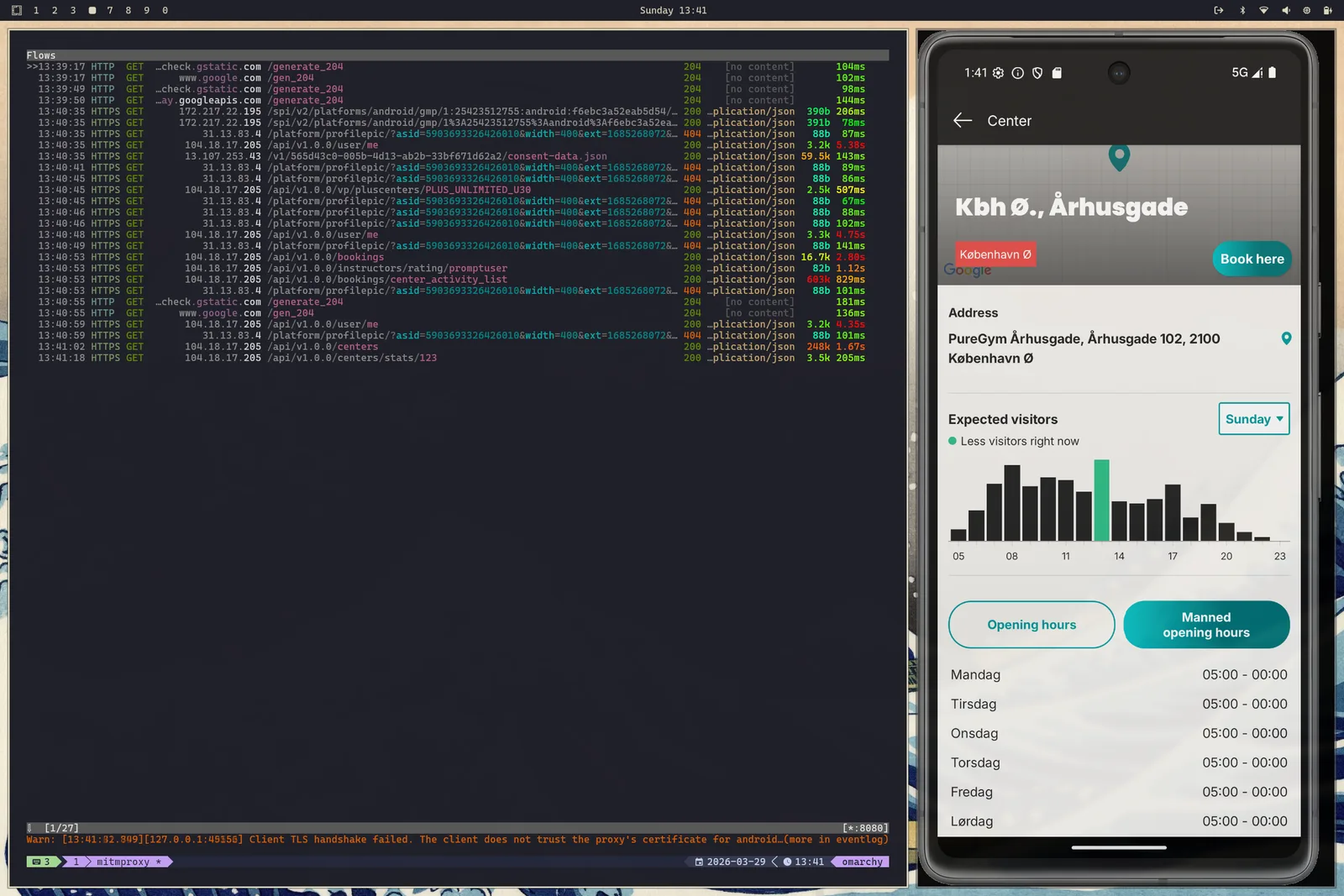
I could then move through the app and check the endpoints it was using. I had the precious internal API endpoints and I could then go ahead and build the richer parts of the package. VICTORY!
The actual MCP
Once I had the internal API mapped out, the rest of the package became much more straightforward. I upgraded most of the brittle web-facing calls to the richer internal API, which made the whole thing faster, more stable, and more capable than the original web-based approach.
From there, building the MCP layer itself was pleasantly smooth. I used the official MCP Python SDK, which made exposing the package as a proper tool server surprisingly simple.
PureGym credentials are provided through two environment variables. Without them, the MCP stays in an anonymous read-only mode and exposes public class and center information. When credentials are configured, it unlocks booking management, upcoming bookings, and the richer account-specific features.
STDIO transport
Local usage through the stdio transport is still the recommended and more secure option. This is the
OpenCode configuration, and chances are your client of choice uses something very
similar:
{
  "mcp": {
    "puregym": {
      "enabled": true,
      "type": "local",
      "command": ["uvx", "puregym-mcp"],
      // optional environment variables for authenticated features
      "environment": {
        "PUREGYM_USERNAME": "your-username",
        "PUREGYM_PASSWORD": "your-password"
      }
    }
  }
}
That works great for tools like OpenCode, Claude Code, VSCode, Codex, OpenClaw, and the list keeps growing. You add a small config block and off you go, especially if you already use uv.
But hold on, wasn’t the video showing the web version of Le Chat using it? Yup, it was. And that brings us to the other transport layers:
Remote MCP
The server is also accessible over streamable-http and sse, so you can host it behind a URL and let remote
clients consume it. That is great and all right up until you remember that your hosted PureGym MCP is now
reachable by someone more than just you.
You can, of course, serve it unauthenticated without the booking functionality. I am hosting one you can use freely at . It is intentionally anonymous and read-only, and if it does not meet your expectations, I am pleased to offer a 100% money-back guarantee.
Auth
MCP clients usually support a few different authentication modes:
- No auth (duh).
- HTTP Bearer token / Basic Auth: send either a token or credentials in the
Authorizationheader of each request. - OAuth 2.1 (sometimes with Dynamic Client Registration).
Since the MCP Docs push you in the direction of setting up OAuth 2.1 with Keycloak as an authorization server, I gave it a try. Halfway through the configuration, though, I had yet another one of those moments of “Man, what am I doing with my life?”: this server is meant to host one user only, and provide that user with their own PureGym functionality.
So, with a bit of prompting (and some reviewing too - Kimi2.5 is too reckless and didn’t care about timing attacks), I got the authentication in place. Now, if you try to run the MCP server with PureGym credentials, it will scream at you if you don’t provide it a token too.
Once you have the server running, you can point your client at it with something along the lines of (again, this is for OpenCode):
{
  "mcp": {
    "puregym": {
      "type": "remote",
      "url": "https://your-server.com/mcp",
      "enabled": true,
      "oauth": false,
      // This is only needed for using the authenticated endpoint
      "headers": {
        "Authorization": "Bearer <your-token>"
      }
    }
  }
}
If you want to try it
The project is now published on PyPI, has a CLI entrypoint, and has docs you can follow to get started:
- GitHub: JorgeSintes/puregym-mcp
- PyPI: puregym-mcp
- Docs: puregym-mcp.jorgesintes.dev
That’s it! thanks for reading. If you end up using it, want more features, or run into bugs, feel free to reach out!